We tested whether AI could create a valid 24/7 employee shift schedule, preserved the exact prompt, and checked the Excel file against five fixed rules.
Result in 30 seconds
4/10 → 10/10
The preserved first result scored 4/10. After one correction, the saved final result scored 10/10 against the same five checks.
Exact model identifier not disclosed by the session
Input mode
Synthetic fixture
Input origin
synthetic-fixture
Execution mode
sandbox-artifact-generation
Run count
1
Published
Aug 9, 2026
Timed run
5 minutes
Final score
10/10
Verdict
worked
Preview the checks before downloading
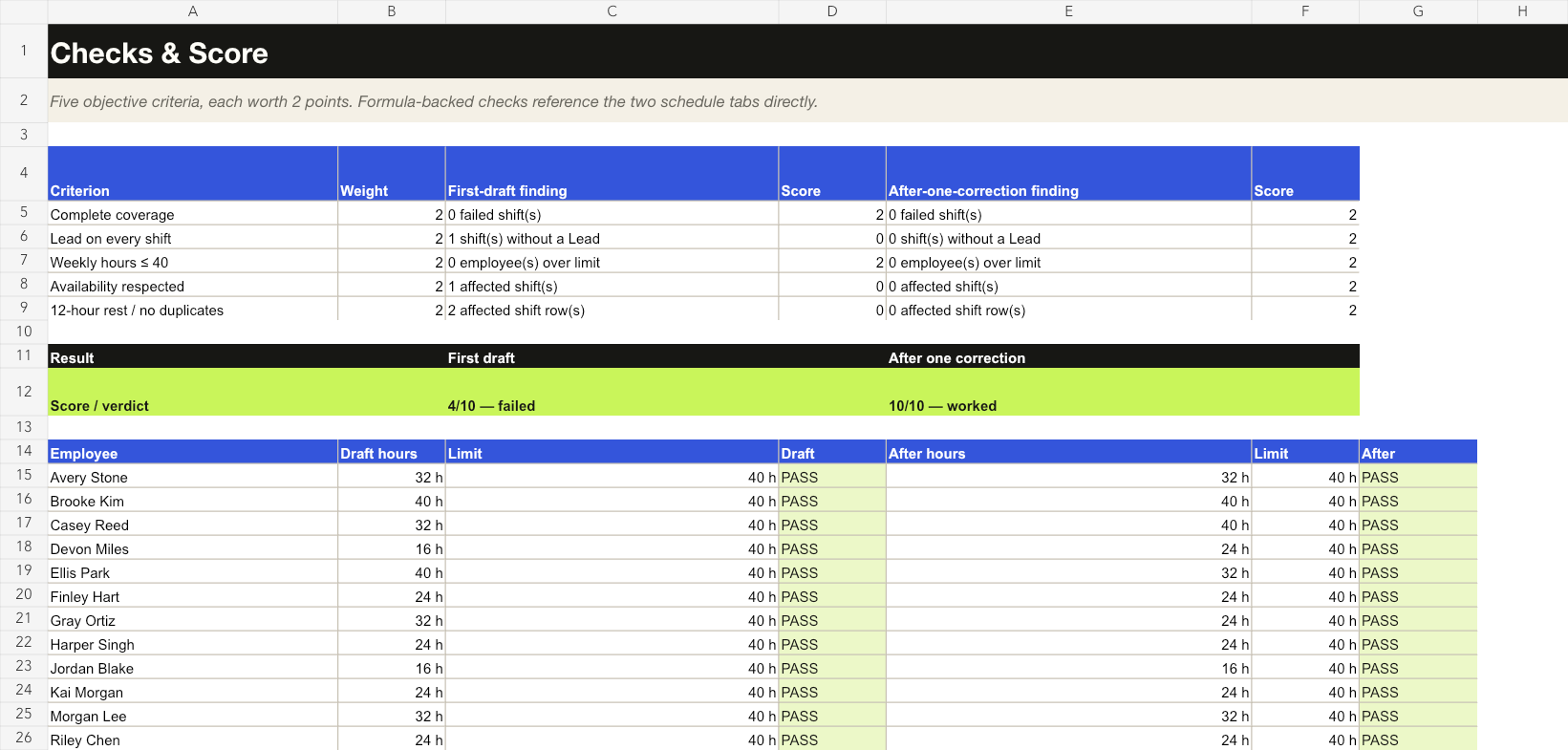
The original workbook preserves both rosters, fictional staff and rules, weekly hours, and the five-check comparison. The first draft failed Lead coverage, availability, and minimum rest; one correction changed two assignments. This is one synthetic test.
Original Checks & Score sheet. Open the image at full size to inspect the cells.
Open Staff & Rules and inspect the fictional input constraints.
Compare the first roster with the corrected roster; retain both versions.
Inspect Checks & Score, then recalculate a separate copy in your spreadsheet application.
The answer to “can AI create a valid 24/7 employee schedule?” was not on the first try. The first draft looked complete, but it scored 4/10. One Thursday night shift had no Lead, Ellis was assigned outside their availability, and that same assignment left only eight hours of rest.
We returned those exact failures to the AI once. It changed two assignments and the revised schedule scored 10/10. We stopped there.
This is a scheduling experiment, not legal or HR advice. Real organizations should add their own labor rules, contracts, time zones, leave, and local requirements before using any schedule.
We created a fictional 12-person support team for the week of August 10–16, 2026. The operation needed two people on each of 21 eight-hour shifts. This made the test a bounded AI shift-schedule problem with rules that formulas could verify independently.
Rule
Requirement
Coverage
Exactly two different people per shift
Lead coverage
At least one Lead per shift
Weekly hours
No one above 40 hours
Availability
Every assignment must be in the supplied availability list
Rest
At least 12 hours between shifts
All names and availability data are fictional. The complete input matrix is included in the downloadable workbook.
The exact first prompt
Create a 7-day schedule for a 24/7 customer support team.

Each day has three shifts:
- Night: 00:00–08:00
- Day: 08:00–16:00
- Evening: 16:00–00:00

Assign exactly two different people per shift. Every shift needs at least one Lead. Respect the supplied availability matrix, a 40-hour weekly maximum, and at least 12 hours of rest between shifts. Do not assign the same person twice in one shift.

Return a table with day, shift, employee 1, and employee 2, followed by weekly hours for every employee.
The test ran inside an OpenAI coding environment. The session did not expose a precise model identifier, so we have not guessed one.
First result: 4/10
The table had all 42 seats filled and nobody exceeded 40 hours. A visual scan could easily have mistaken it for a finished schedule. Formula checks found three distinct AI scheduling errors:
Thursday Night had no Lead. Gray Ortiz and Harper Singh were both Agents.
Ellis Park was unavailable on Sunday Day.
Ellis had only eight hours of rest between Saturday Evening and Sunday Day. The workbook marks both affected rows, but this is one rest-conflict pair.
Criterion
First draft
Complete coverage
2/2
Lead on every shift
0/2
Weekly hours ≤ 40
2/2
Availability respected
0/2
12-hour rest / no duplicates
0/2
Total
4/10 — failed
The one correction
We did not rewrite the prompt or silently repair the table. We returned only the detected failures:
Your first schedule has three validation failures:

1. Thursday Night has no Lead.
2. Ellis Park is not available Sunday Day.
3. Ellis Park has only 8 hours of rest between Saturday Evening and Sunday Day.

Make one correction pass. Keep every valid assignment unchanged where possible and return the full revised schedule. All original constraints still apply.
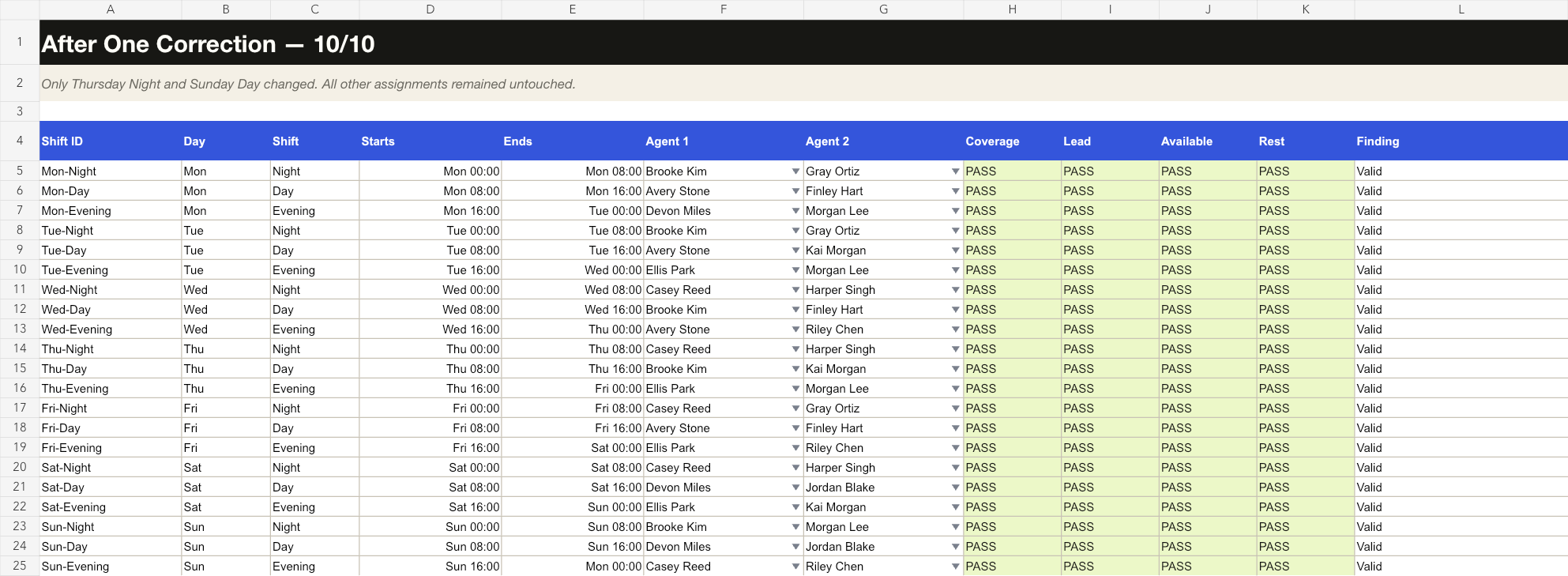
The revised result made two substitutions:
Thursday Night: Gray Ortiz → Casey Reed
Sunday Day: Ellis Park → Devon Miles
Every other assignment stayed unchanged.
Final result: 10/10
The corrected 24/7 support schedule with all formula checks passing
The second pass filled every shift, restored Lead coverage, respected every availability entry, kept all employees at or below 40 hours, and removed the short-rest conflict.
The formula-backed comparison showing the first draft at 4 out of 10 and the corrected result at 10 out of 10
What worked
The AI repaired both bad assignments without disturbing the 19 valid shifts.
The correction handled two connected problems—availability and rest—with one change.
Weekly hours remained balanced enough for this small fictional test, with every person at 16–40 hours.
What failed
The first response did not reliably enforce role coverage.
It treated an unavailable assignment as acceptable.
It missed a rest rule that required comparing adjacent assignments across two days.
The first table looked plausible despite failing three rules. Without independent checks, we would not trust it.
Verdict
Worked after one correction. AI was useful for producing and repairing the schedule, but the first answer was not safe to use without validation. The spreadsheet—not the confidence of the prose—decided the score.
For a reusable process, follow the AI-generated schedule validation checklist. It explains each check, includes starter Excel formulas, and shows which real-world constraints must still be added.
Reproduce the test
Open the workbook and review Staff & Rules.
Paste the exact first prompt and availability matrix into the AI tool you want to test.
Copy its output into a new schedule table without fixing it.
Run the five checks and record the first score.
Return only the detected failures once, then score the full revision.
If your result differs from ours, keep it. Model behavior can change over time, and disagreement is part of the evidence.